
VoIP and SIP Phones for Business,
Set Up Before They Reach the Desk
Which SIP phones do you supply and install?
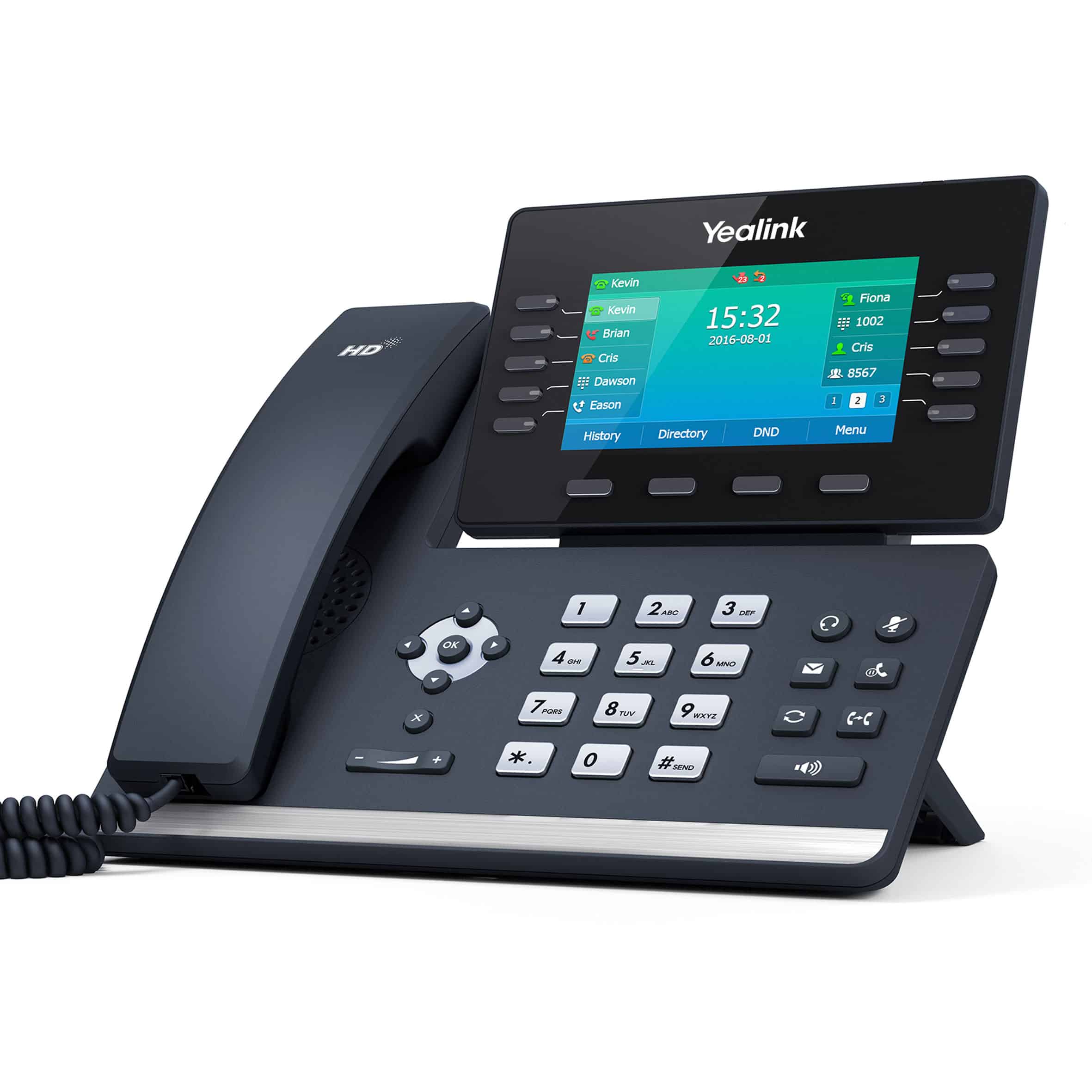
VoIP Services Now is the business phone service run by SRS Networks, a Salinas, California company operating since 1996. We supply Yealink SIP desk phones (SIP-T31P, SIP-T33G, SIP-T43U, SIP-T53W, SIP-T54W, SIP-T57W, SIP-T46S, SIP-T48S), the Yealink CP965 conference phone, the Yealink W76P DECT cordless phone, and Grandstream HT801 and HT802 analog adapters. Handsets are pre-provisioned to your hosted phone system and installed onsite. With a 1-year commitment, desk phones rent for $7 a month (standard) or $9 (executive), and installation is quoted separately. Call (866) 601-3636.
SIP Desk Phones, from the Entry-Level T31P to the T57W Touchscreen
A Conference Phone for Boardrooms and Training Rooms
Wireless SIP Phones for Staff Who Are Never at a Desk
Analog Adapters That Keep Fax, Paging, and Alarm Dialers Working
Fax machine lines: $13.99 a month with a 1-year commitment, adapter included
When You Shouldn't Rent Phones from Us
If you already own compatible phones in good condition (Yealink, or other SIP phones not locked to your current provider), keep them. We provision them onto the new system instead, which is normal work, and you pay no rent on a phone you already own. Send us the model list before anyone quotes you new phones.
If you want month-to-month, phone rental is not part of it: it comes only with a 1-year commitment. Bring compatible phones you own, or use the mobile and desktop apps, which every plan includes.
And if your staff live in a headset on a laptop, desk phones are furniture. An app-only deployment is cheaper and works better for them. Put handsets at reception, in conference rooms, and with the people who are genuinely on the phone all day.
Match the Device Category to the Role
| Role | Catalog starting point | Confirm before choosing |
|---|---|---|
| Desk calling | Yealink T31P, T33G or T43U | Keys, headset needs, power and Ethernet |
| Reception | Compare executive desk models such as T54W | Transfer workflow, display and required controls |
| Walking the building | W76P DECT cordless | Site coverage and separately quoted equipment |
| Meeting room | CP965 conference phone | Room layout, pickup needs and quoted equipment |
| App-based employee | Mobile or WebRTC computer app | Headset, connectivity and business-call workflow |
Choose a device for each job, rather than one model for every desk
Apps can cover some roles without a handset. Reception, a meeting room and staff walking a building need different controls and physical checks.
- Reception and desk work
- List the transfers and people the answerer needs to reach. Check the display, line keys, headset requirements and how to handle an unanswered transfer. A larger screen matters only when it helps the person answer and route calls.
- Meeting rooms and mobile roles
- Match a conference device to the room and seating arrangement. For DECT cordless, describe walls, racking and the route staff walk; device specifications alone do not establish coverage inside your building.
- Reuse and network readiness
- Send existing model numbers and check ownership, provider locks, firmware and compatibility before promising reuse. Confirm Ethernet access, power and any network work. An analog adapter also needs a device-specific compatibility review.
A practical acceptance check
An illustrative reception test is to answer with the intended headset, transfer to a colleague, retrieve an unanswered call and identify the expected outbound caller ID. For cordless work, add a call along the agreed walking route.
What to tell us first
List quantities by role, existing models, headset needs and site city or ZIP. Standard and executive rental eligibility follows the catalog; conference, cordless and other equipment are quoted for the job.
Tell us about your office
Get a phone-service quote with the installation scope spelled out. Compare the whole job before deciding which provider fits.
Request a phone-system quote
Step 1 — What do you need?
What to settle before you switch
- 1
We review your requirements
Start with users, site locations and the system you have today. You do not need a finished specification to ask for a quote.
- 2
Separate service, equipment and installation
Ask for the recurring plan, optional desk phones, onsite work and applicable fees to be shown separately. Site readiness and devices determine the installation scope.
- 3
Agree the port and installation plan
Contract dates, site access and carrier confirmation shape the target cutover. Keep current service active until the number transfer is confirmed complete.
VoIP Phone FAQs
Do you publish handset prices?
Do the phones arrive configured?
Can we keep handsets we already own?
Do the desk phones need power adapters?
How many cordless handsets can one base support?
What about fax machines and paging amplifiers?
Do app-only employees need to rent a desk phone?
What should we test before accepting the equipment?
Get the Handsets Quoted with the System
Tell us your extension count and current provider. We price the port and the install together.
845 West Market Street, Suite P, Salinas · Support 24/7 · No multi-year contracts